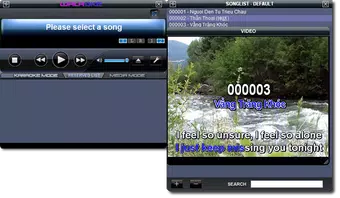

Download Walaoke – karaoke, music, video, background, live, custom, format, replacement, performance, personalize, enhance, sing, sing along, sing with friends, sing at home
Overview
Walaoke delivers a modern approach to karaoke by combining music playback with customizable visual experiences. Designed for users who want to elevate their singing sessions, the app enables the use of live video feeds or custom video backgrounds during performances. This functionality allows singers to personalize their karaoke experience, transforming simple sing-alongs into immersive visual events. The app is particularly suited for home entertainment, social gatherings, and creative expression, offering a unique blend of audio and visual customization. Walaoke targets individuals who enjoy singing, whether casually or competitively, and seek tools to enhance their performances. It appeals to users of all ages, from teenagers to adults, who value creativity and control over their entertainment. The app’s focus on personalization suggests it is ideal for those who want to stand out during karaoke sessions, whether at home or with friends. By supporting a wide range of video formats and enabling background replacement, Walaoke addresses common compatibility and customization challenges in traditional karaoke apps. Although the developer did not provide additional technical details, the app’s long-standing presence since 2011 indicates a stable foundation and sustained user interest. Its continued availability on Android suggests reliability and ongoing maintenance. In the broader app ecosystem, Walaoke fills a niche for users seeking more than standard music playback—offering a dynamic, interactive karaoke experience that blends performance and creativity.Key Features & Functionality
Walaoke stands out through its suite of features designed to enhance the karaoke experience with visual customization and playback reliability. The app supports the use of custom video backgrounds, allowing users to replace default music videos with their own content—such as personal photos, home videos, or live camera feeds. This feature empowers users to tailor the visual environment to match their mood, theme, or performance style, making each session uniquely expressive. Another notable capability is extensive video format support, including MKV, VOB, DAT, MPG, and others. This ensures that users can play their favorite tracks without needing to convert files, preserving file integrity and reducing setup time. The ability to replace original music videos with user-uploaded content adds a layer of creativity, enabling singers to perform in custom virtual settings—ideal for themed parties or personal showcases. The app also includes a dedicated feature to prevent accidental disruptions during playback. This safety mechanism helps maintain uninterrupted performance flow, allowing users to focus on their singing without fear of unintended pauses or exits. Combined with a user-friendly interface, these features collectively support seamless navigation and intuitive use. Whether used for solo practice or group entertainment, Walaoke’s functionality supports both casual and dedicated users in delivering polished performances.- Custom Video Backgrounds: Use personal videos or live camera feeds as visual backdrops.
- Extensive Format Support: Play MKV, VOB, DAT, MPG, and other common video formats.
- Original Video Replacement: Swap default music videos with user-provided content.
- Accidental Disruption Prevention: Minimize interruptions during playback.
- User-friendly Interface: Intuitive layout suitable for all age groups.
Interface, UX & Performance
Walaoke features a clean and straightforward interface designed to prioritize ease of use. The layout appears optimized for touch navigation, with clearly labeled controls and accessible menus. Users can quickly access core functions such as video selection, background customization, and playback settings. The visual design emphasizes functionality over ornamentation, aligning with the app’s practical purpose. Navigation flow is consistent and logical, allowing users to move between features without confusion. The app’s responsiveness appears to be well-managed, enabling smooth transitions between video loading, playback, and background switching. Although the developer did not list formal performance metrics, the app’s ability to handle multiple video formats suggests efficient resource management. Performance across different device categories is not specified, but the app’s lightweight size of 100 MB indicates efficient use of storage. It is likely to run smoothly on mid-range Android devices, though high-end devices may offer enhanced visual rendering. Stability is supported by the inclusion of a disruption prevention feature, which contributes to a reliable user experience. Overall, the interface and UX reflect a mature product focused on usability and consistent playback.Platform Compatibility & Technical Requirements
Walaoke is available exclusively on the Android platform. The current version is 1.0.0, with a file size of 100 MB. This suggests a compact, lightweight application that does not require extensive storage space. The app is free to download and use, making it accessible to a broad audience. The developer did not specify minimum OS requirements or compatibility details for specific Android versions. As a result, users should verify device compatibility through official app stores. While the app has been available since 2011, its current functionality may depend on modern Android system updates. Users are advised to ensure their devices are running a supported version of Android to avoid potential issues.Pros and Cons
- Supports a wide range of video formats including MKV, VOB, DAT, and MPG.
- Allows custom video backgrounds and live camera feeds.
- Enables replacement of original music videos with user content.
- Includes a feature to prevent accidental playback interruptions.
- Designed with a simple, intuitive interface for all skill levels.
- Specific OS requirements were not listed.
- Compatibility with newer Android versions is not confirmed.
- No information on cloud sync or media library management.
- Developer did not provide details on update frequency.
- Platform availability is limited to Android only.


